On accessibility audit automation
If you follow my LinkedIn feed, you may have noticed a post from Valentine’s Day 2025 about a piece I contributed to in the Association of National Advertisers (ANA — create a free account to read) describing how advertisers and publishers are getting ready for the European Accessibility Act (or EAA) that comes into effect in June of 2025.
Spoiler alert: advertisers and publishers are not ready for accessibility (shorthand: a11y — ‘a’ followed by 11 letters then ‘y’)
Compliance officers do it by the book
The EAA provides a11y requirements for products and services which, for digital properties such as websites and mobile apps, amount to additional constraints for brands and site owners. Frankly, they are too often the last to know about regulations such as the EAA, and rely on creative and consulting agencies to pick up the slack when it comes to legally-induced requirements.
Unlike the GDPR (a regulation), the EEA is a directive, meaning that EU member states can be somewhat creative in their implementation of a11y laws.
Up until now, Web authorities such as the W3C (World Wide Web Consortium) have provided a11y guidelines but the EAA means the list of compliance items to check for might be challenging to manage. This is where automation comes in.
For the purpose of this post, we’ll focus on digital a11y tests in these areas:
- color-blindness and color contrast issues
- low/poor visibility
- hearing disability
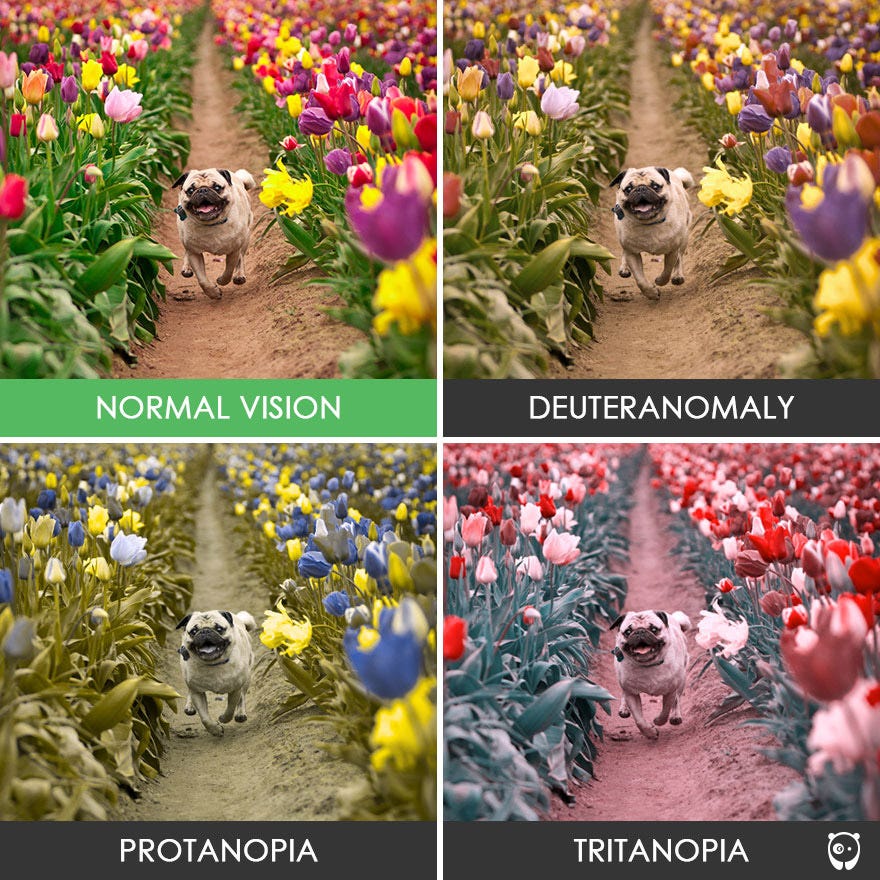
Visions of color blindess — from boredpanda.com
Color-blindness and color contrast issues
As you can see from the image above, color-blindness has different flavors.
When it comes to sites and apps, the color-blindness issues rarely lie with the page’s color scheme, but rather with images.
To programmatically determine if an image is colorblind-friendly, you need to analyze the color contrasts and simulate different types of color vision deficiencies.
Here’s how you can approach this:
- Analyze color contrasts — Check that color pairs used for important elements have sufficient contrast
- Simulate color vision deficiencies — Visualize how the image appears to people with different types of colorblindness
- Check for problematic color combinations — Identify commonly confused color pairs
Let’s bring out Python and JavaScript to play and help us analyze pictures:
- Python: color-blindness-test.py
- JavaScript: color-blindness-test.js
As you run the scripts, you can easily sort images into “friendly” and “unfriendly” buckets. Of course, you can build your own little pipeline for image analysis.
Low/poor visibility
In the case of low/poor/no visibility, you want to be sure that users/consumers can know what a visual is about. There is software to assist the visually impaired and read text out loud. This is why media metadata and alternative text is key to online a11y. Adding an ALT attribute to all images on your website is not to please the SEO gods: ALT text is useful and provide key context to disabled users.
The World Wide Web Consortium (W3C) has created a very useful guide on how to create useful alt-text.
 Image tags in HTML come with ALT attributes — credit: Yooda Blog
Informative images: Images that graphically represent concepts and information, typically pictures, photos, and illustrations. The text alternative should be at least a short description conveying the essential information presented by the image.
Decorative images: Provide a null text alternative (alt=””) when the only purpose of an image is to add visual decoration to the page, rather than to convey information that is important to understanding the page.
Functional images: The text alternative of an image used as a link or as a button should describe the functionality of the link or button rather than the visual image. Examples of such images are a printer icon to represent the print function or a button to submit a form.
Images of text: Readable text is sometimes presented within an image. If the image is not a logo, avoid text in images. However, if images of text are used, the text alternative should contain the same words as in the image.
Complex images such as graphs and diagrams: To convey data or detailed information, provide a full-text equivalent of the data or information provided in the image as the text alternative.
Groups of images: If multiple images convey a single piece of information, the text alternative for one image should convey the information for the entire group.
Image maps: The text alternative for an image that contains multiple clickable areas should provide an overall context for the set of links. Also, each individually clickable area should have alternative text that describes the purpose or destination of the link.
How does one automate ALT text detection, you ask? Thankfully we’ve been doing that for decades and the process originally went as follows:
- Go to web page
- Download or view the source code for the page
- Parse the HTML for the presence of an IMG image tag
- Check the presence of an ALT attribute within the IMG tag
- Report
- Fix HTML
- Rinse and repeat
In a more modern context, this could look like:
- Queue a list of pages for browsing in a web browser
- Analyze the DOM of the fully loaded pages and look for IMG tags and their corresponding ALT attribute
- Connect to the Content Management System and post updated values for ALT attributes
- Plan new scan for later date
“But Julien, can’t we just use wget and download a bunch of URLs?”
Normally I’d agree with you but a substantial number of websites are generated on-the-fly with all sorts of content (including images) being injected into the DOM. This is why using a headless browser really helps run a more exhaustive analysis on a very large number of pages.
Hearing disability
 Photo by Monica Flores on Unsplash
This bit may sound like an exaggeration but this particular part is about video subtitles and visual cues. If we were talking about modern video games, vibration and color signals (think PlayStation 5 controllers) can provide key context but that’s not exactly available for websites and apps. Or maybe it should :-)
Making sure a given video on a site has matching subtitles is generally easy to check for, especially of the subtitle file follows a naming convention similar to that of the video itself, with extra variants for languages. Some e-learning sites offer karaoke-style follow-along transcripts.
In this use case, you really want to check for the presence and consistency of the text elements. Should a text element be missing, we now have tools and media APIs for transcript generation that provide helpful text version of a video or audio element. Google’s Text-To-Speech and Translation APIs is a perfect of those APIs and tools.
Extra credit: additional automation ideas
If you feel the need to dig deeper, here are additional ideas!
- Keyboard Navigation Testing- Automate testing of tab order and keyboard traps
- Build scripts that verify focus states are visible - ARIA Role Validation- Create tools that verify proper ARIA implementation
- Check for proper semantic HTML as a first alternative to ARIA - Screen Reader Compatibility- Automate testing with popular screen readers using scripting
- Record and analyze navigation paths and information access - **Dynamic Content Accessibility
**- Build tools to verify that dynamic content changes are announced to assistive technologies
- Test SPAs and JavaScript-heavy applications - **Form Validation Accessibility
**- Automate testing of error messages and form field labels
- Verify that validation errors are properly communicated
In conclusion
This post was meant to introduce you to three use cases you will be faced with when the EAA comes into effect late June of 2025.
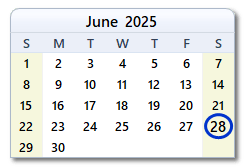 June 28, 2025 is coming? Are you ready?
If you are already familiar with the W3C a11y guidelines, you know a bunch of these guidelines can be automagically audited but hopefully the three examples will inspire you to dig deeper.
what about you? How do you handle accessibility? Who is in charge in your organisation? Are you ready for June 2025 and if not, do you need help?