Automating your website’s landing page creation and deployment processes
I recently went freelance after my previous role came to an end and I had to set up all the tools I needed to market myself as a data & analytics professional (beyond LinkedIn, I mean). This meant building a website with landing pages related to each of the services I now offer.
But let’s see how I went about that!
The Requirements
I decided to be strict with I wanted about the site — but most of all with what I did not want:
- Low footprint: no Wordpress and the unnecessary clutter and bloat that comes with it, (and don’t get me started with Hugo etm.)
- No database either
- Lightweight pages, around 0.01 Dooms per page for the HTML
- Multilingual support required
- Needs to be portable and editable on the go
- Easy backup and versioning
- CI/CD-friendly
Quite the shopping list, eh? Here’s how I addressed it and built my site factory.
Python. It’s always Python with me.
Yes I know, this project could have been accomplished with PHP or Perl. Heck, even awk. Anyway, I like Python and this time the library footprint was small.
For this, I’m going to use the Command Line Interface Creation Kit module, aka Click. As the name suggests, Click is very much CLI-based and can help you create nested instructions and provides helpful options to manage… command line options.
Sometimes, I’m tired of JSON.
So I use YAML as a structured file format to store the content for my pages, as well as a whole slew of parameters
# Common content for all pages
common:
en:
BOOKING_TEXT: “LET’S CHAT 📞”
CTA_TEXT: “GET A FREE QUOTE 💰”
FORM_LABEL_NAME: “Your Name”
FORM_LABEL_EMAIL: “Email Address”
FORM_LABEL_PHONE: “Phone Number (optional)”
FORM_LABEL_COMPANY: “Company Name (optional)”
FORM_LABEL_MESSAGE: “Your Message”
FORM_LABEL_MESSAGE: “How can I help you?”
FORM_SUBMIT_TEXT: “Send Contact Request”
CONTACT_INFO: “Email: contact@juliencoquet.com”
CONTACT_TITLE: “Information for your free quote”
THANKYOU_TITLE: “Thank You”
The above allows me to set language-based parameters (French and English in my case) and bits of text for all my pages. Then I create subsections based on each service I want to promote:
google-sheets:
en:
TEMPLATE_NAME: “default.html”
PAGE_TITLE: “Google Sheets Optimization”
META_DESCRIPTION: “Data expert offers spreadsheet troubleshooting and optimization services. Advanced Google Sheets and Excel support.”
HERO_TITLE: “Spreadsheets got you down?”
HERO_DESCRIPTION: “Supercharge your spreadsheets with professional optimization, custom automation, and advanced data management solutions that boost productivity and precision”
HERO_IMAGE_URL: “/assets/img/spreadsheets.png”
HERO_IMAGE_ALT: “Spreadsheet Optimization Services”
BENEFITS_TITLE: “Expert Spreadsheet Solutions”
BENEFIT_1_TITLE: “Advanced Spreadsheet Architecture”
BENEFIT_1_DESCRIPTION: “Transform complex, sluggish spreadsheets into efficient, maintainable solutions. I optimize formulas, streamline data flows, and implement best practices for performance and reliability.”
Here, I start listing data used in the generation of this page. The English version of the Google Sheets Optimization service page contains bits from the above list of parameters. Parameters for each service override the default ones set in the previous section.
HTML is still not a programming language
As I’m sure you can tell from the variable names, those are placeholders to be used in a HTML template parser. Once you create one or more templates, Python can loop through each entry in the YAML content file and generate individual, lightweight HTML pages.
Yes, this includes my Google Tag Manager data layer and event tracking.
Now every time I need to add a new service, I just need to add new YAML entries, run the generation script, and BAM! I get new HTML content ready for upload to my hosting provider (more on that later).
Version Control to Major Code
(I’m tired, OK?)
Of course, I’m doing this primarily on my own machine and I want to make sure my code doesn’t go *poof* at the first occurence of a technical issue.
I can hear it coming: “Use Github, Julien!”
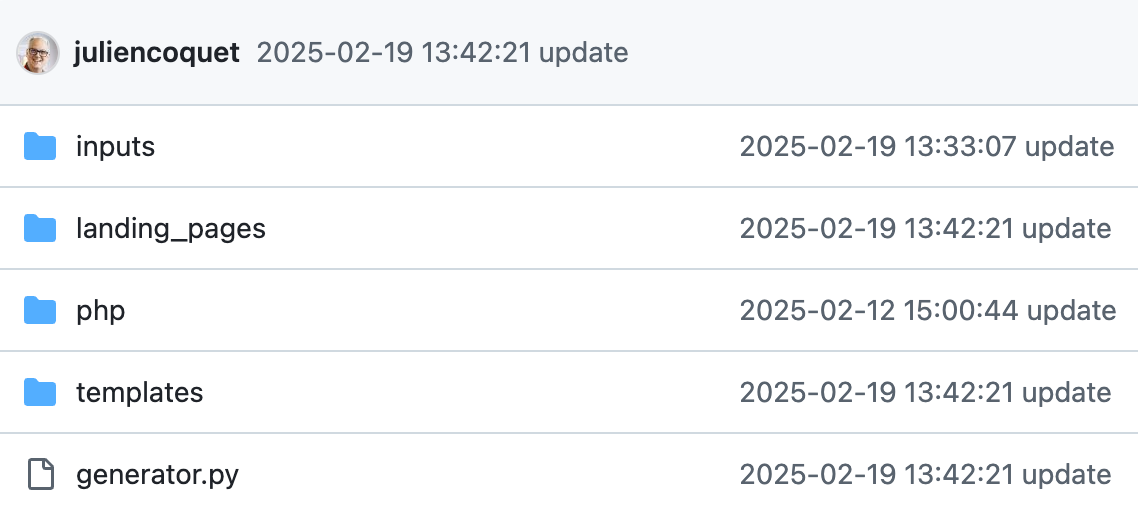
Way ahead of you! The generator… generates HTML files and all the required assets (.htaccess, sitemap, etc.) and then identifies modified elements with git add, generates a commit message, then pushes changes to GitHub.
# This is generated in generator.py
git config advice.addIgnoredFile false
git add *
git commit -m “2025-02-19 13:42:21 update”
git push
Always nice to have GitHub reflect the changes 🙂
Of course, you can use AI to generate a commit message based on the nature of the changes!
Uploading your spiffy new site
At this point, you can go with the old school method and fire up your favorite (S)FTP client and transfer your files to the website. But what if you were lazy, er, efficient?
If your web host supports SSH or a decent shell, you can just ask your host to pull a fresh copy of your website from GitHub! In order to do that, you would need to log onto your host and run a git pullcommand.
But what if you could skip that step too?
You know I love cloud functions so you know I’m going to try and trigger the git pullcommand remotely as part of the generation process.
This is where you want to use something to the effect of wget or cURL:
wget https://lp.yoursite.com/deploy.php
You guessed it, that PHP script execs (runs) the git pullcommand and effectively copies the HTML files to your website’s folder(s).
All together now
Let’s recap! We’ve gone through the motions so here are the steps:
- Create a content structure using YAML (or JSON)
- Build your HTML template and add placeholder logic
- Use Python to parse the template, populate the placeholders, and generate HTML & misc assets files
- Backup changes to GitHub
- Call remote script on your hosting provider to pull the latest copy of your static site
- Profit!
What’s next?
I might make a version of my repo public but in the meantime, I encourage you to explore this method. Smaller, more compact HTML files makes for faster-loading pages, better SEO rankings, and a more enjoyable user experience overall!
What about you? Which route did you take for your website? Let me know via the contact form!