How I upgraded to fiber Internet and never going back
There is a saying: “if you want to know what a person is really like, see how they behave when exposed to slow Internet speeds”. I thankfully do not blow my top or throw furniture at people, but I fully appreciate how frustrating slow Internet can be, both for professional and domestic use.
Slow Internet brings out the worst in us — source: Giphy
As of November 2024, I will have lived 10 years in my house and still can’t realize how my Internet bandwidth improved since I finally got access to optic fiber connection in the summer of 2023. This post is about how and why I got so serious about the upgrade to fiber, aka FTTX.
The situation
I’ve worked from home for the best part of the last 25 years so Internet access was key. I live in semi-rural France and my modem was at the very end of the DSL line, meaning low Internet speeds and high latency.
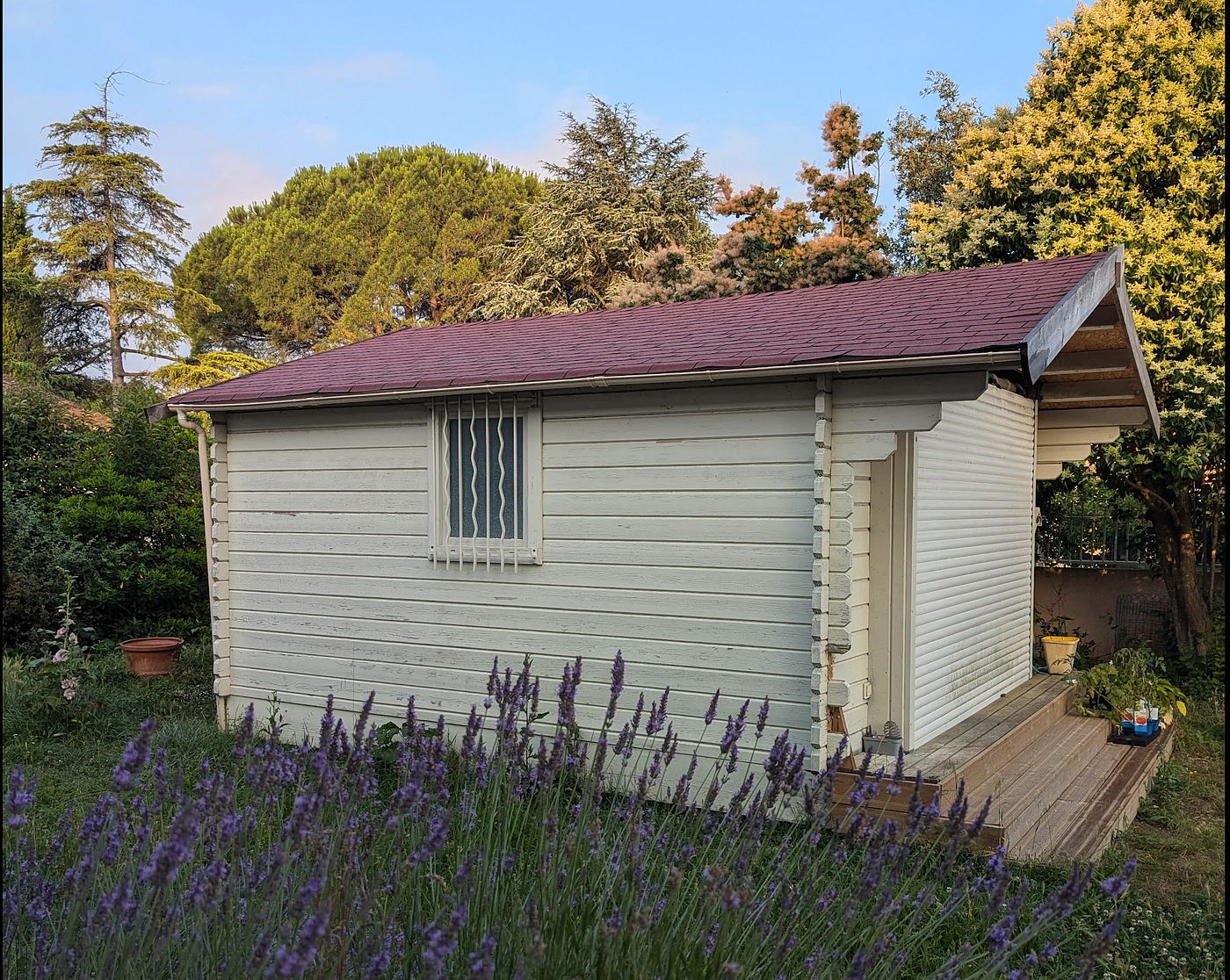 My cybershed, complete with air conditioning, heating… and Ethernet access
When I moved into the house, in November 2014, I was told “the neighbourhood would be hooked up to fibre in the next 6 months”. Using video conferencing was touch and go. IP television was subpar. Forget about online gaming or downloading entire games.
Most times, when I needed optimal bandwidth, I actually resorted to using my phone as a 5G WiFi access point.
Additionally, my house had been struck by lightning a couple months prior to the arrival of fiber, so this was an occasion to ask rewire my house with Category 7 Ethernet cables to go along with supposedly high speeds that fiber would bring.
Between local regulations, feuds between ISPs, COVID, digging up my garden, and having to explore my crawlspace, I eventually got hooked up in September of 2023 — but it took a whole lot of jumping into hoops…
Digging for copper
Even if my ISP offered the upgrade from DSL to fiber for free, I upgraded my modem, paying only a one-time 50EUR modem upgrade fee. The ISP sent a contractor to install the actual fibre cable and outlet.
The way they do it is use the path of the now-obsolete copper phone cable with a guide “needle” and then push/pull the fibre cable all the way. Sadly, when they tried to guide the cable, it got stuck somewhere between the telco access point outside my property and my house. Per regulation, telco and utility cables run through a green pipe. This means I had to dig up my garden to find said green pipe and identify where it may bend or cause blockage. After digging at least one meter deep across about 5 meters, I eventually located the green telco pipe.
As you can see from the picture below, the state of the pipes made it impossible to guide the cable properly.
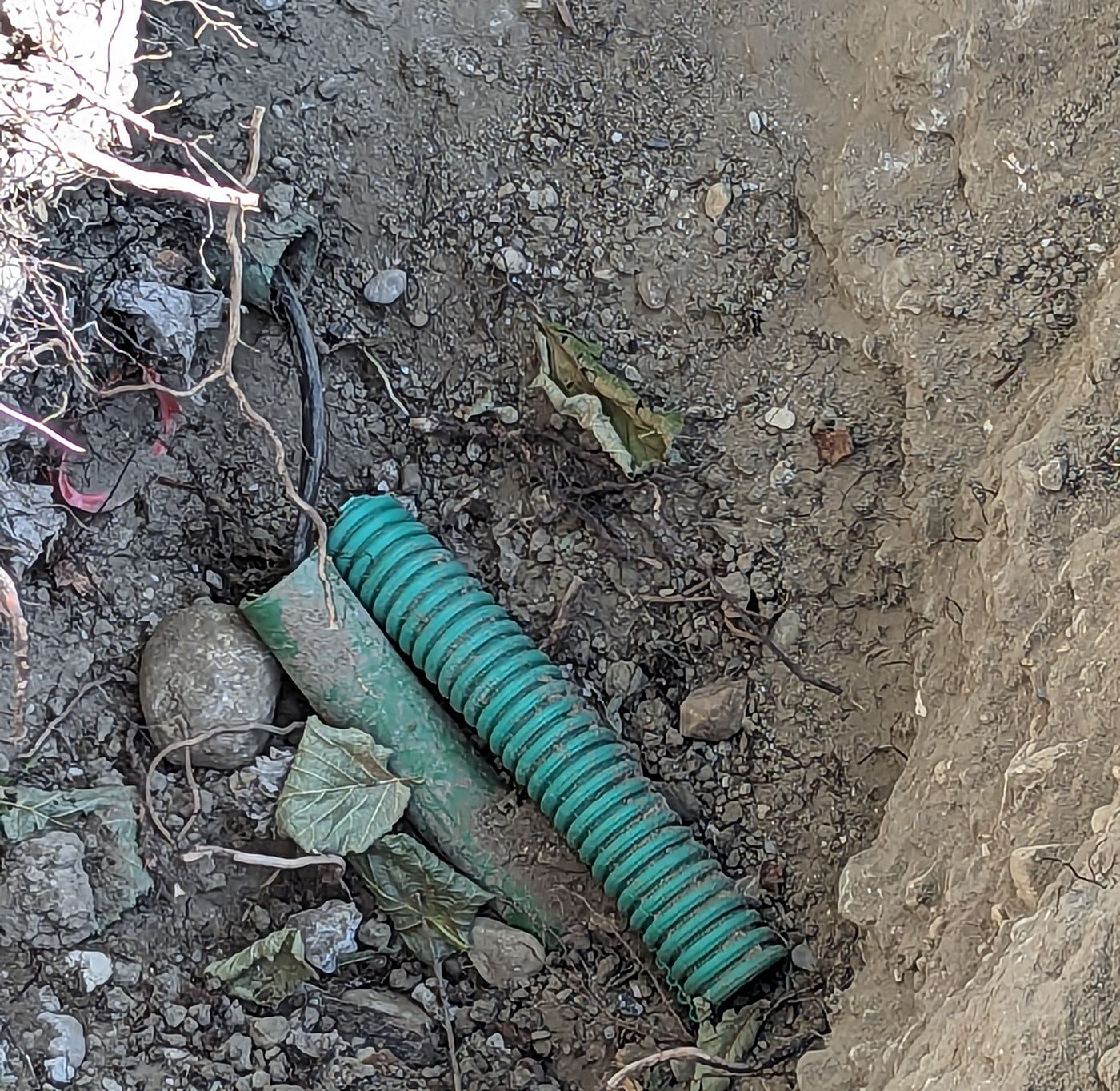 Locating the phone line 1 meter underground was fun
Sadly, that was not the end of it. As I tried using a guide cable in the newly discovered telco pipe, the cable would not end up where it should and appeared to be aiming endlessly in the crawlspace. At this point, I was able to explore the crawlspace to discover a mess of pipes. As you can see below, I needed to have that green pipe fixed.
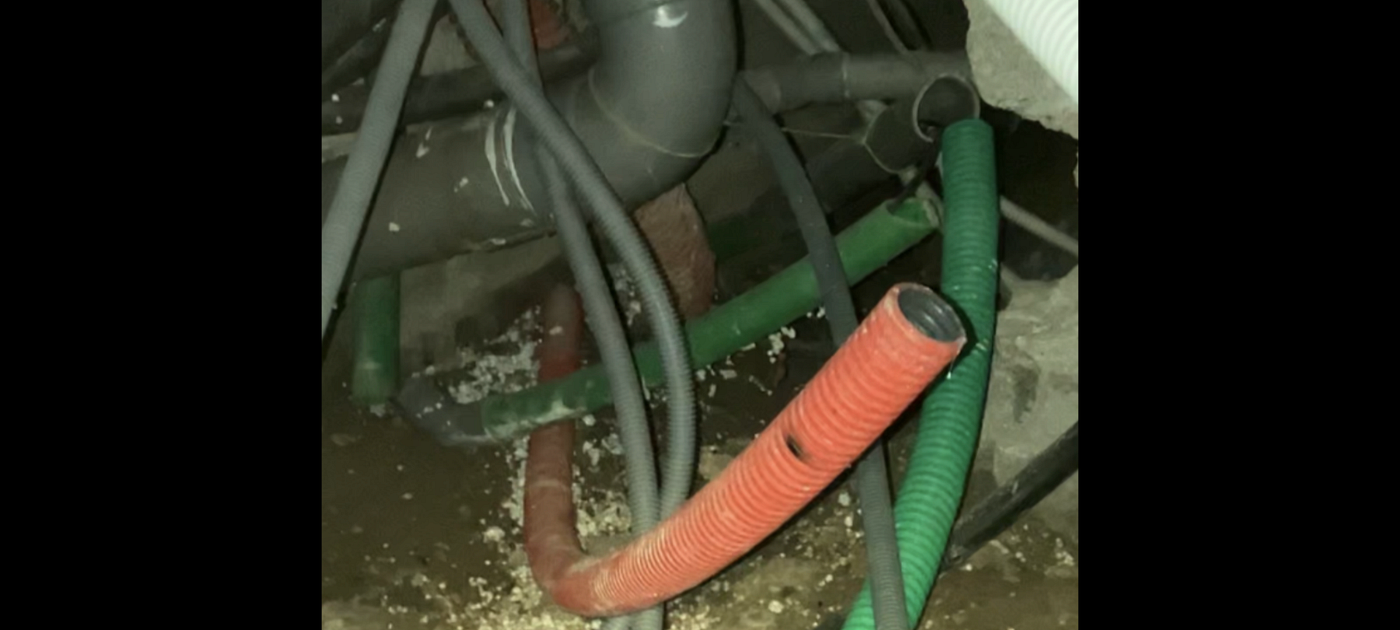 Crawlspace exploration — phone line ran through that green pipe
Thankfully, a local handyman was able to repair this with a brand new length of green pipe, making sure the copper line could indeed be used as a guide. I then called back the contractor to install the fiber cable and outlet. From there I hooked up my new modem and sure enough, I rocketed out of the Information Middle Ages. I had access to FTTH: Fiber To The Home.
So what changed?
That new modem offers a theoretical bandwidth of up to 5Gbps for downloads and 700Mbps for uploads. the modem comes with WiFi6, and there is an upgraded model that offers WiFi7 performance — but I’m an Ethernet cable fan.
While the initial bandwidth was closer to 400/200 mbps, the difference was staggering. Eventually the network stabilized and improved, finally getting me closer to gigabit and then multi-gigabit speeds, up to 2/2.5Gbps.
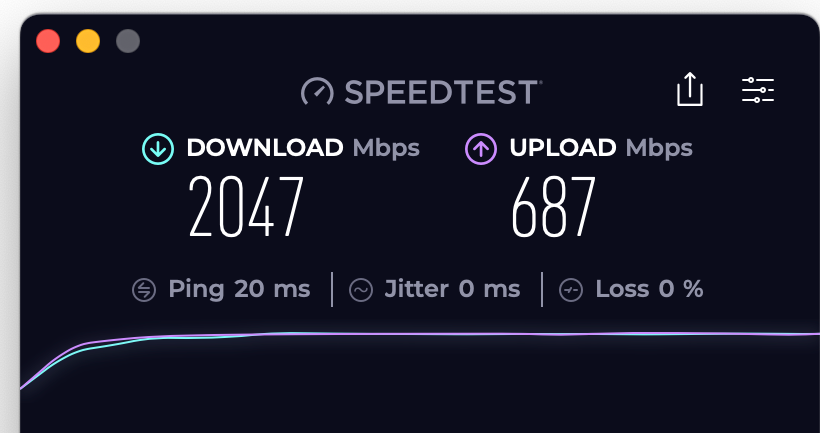 Capture from speedtest.net
Of course, there not that many sites or apps that match that speed but (re-) installing software and games in minutes instead of days was a game changer. My home network and connected apps also saw a dramatic improvement (home servers and appliances, mostly).
In general, the multiplying factor from 2014 is staggering, as shown below:
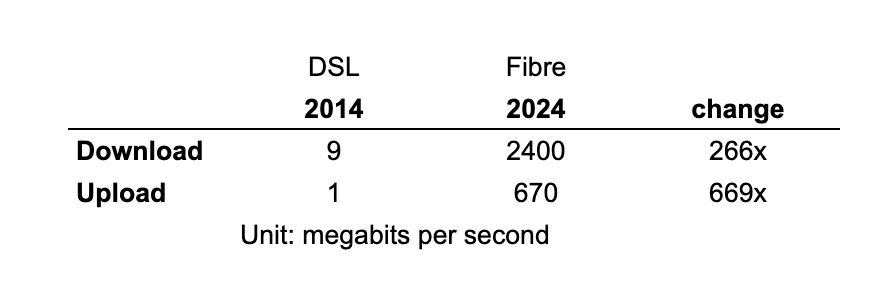 Internet speed comparison before and after switching to fiber
As you can see the larger multiplier is for uploads, which instantly (and finally) made streaming and/or participating in live online events practical.
All I needed to do now is wire the house.
Cables rule
Like I said earlier, I used Category 7 (Cat7) Ethernet cable for this project. Why Cat7 and not Cat8, you ask? Of course, Cat8 Ethernet cables exist and offer higher performance but, at the time, they were not so readily available for purchase and their cost per meter was expensive.
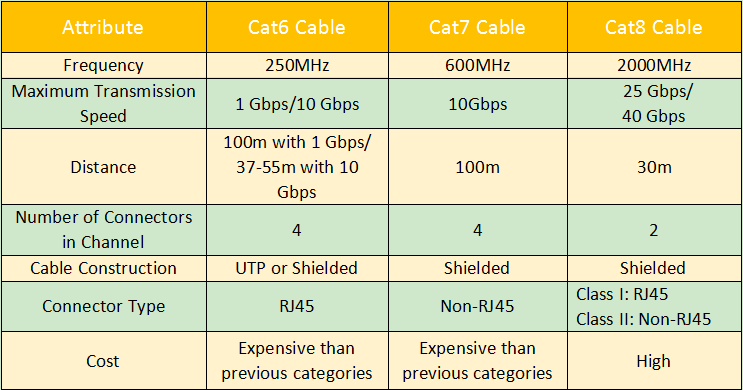 Ethernet cable categories and performance — source: stl.tech
Upgrading to Cat8 when it becomes relevant will be as easy as pulling cable, using the existing Cat7 cable as a guide. To that effect, the latest reconstruction work in my house includes Ethernet cables that spread to both living areas. Ethernet outlets were added so switches or WiFi routers can be installed to further extend network coverage.
The setup
In order to make the most of multigigabit speeds from FTTH, I bought a pair of 2.5Gbps-capable network switches from Binardat. They offer 5 multi-gigabit ports and allow for separate devices to benefit from most of the Internet juice when they need it.
Also, because most current network ports only offer up to gigabit speeds, you need an adapter for laptops so i went with 2 USB-C 2.5Gbps adapters by UGREEN. If you have a desktop computer, get an Ethernet card that supports high speeds.
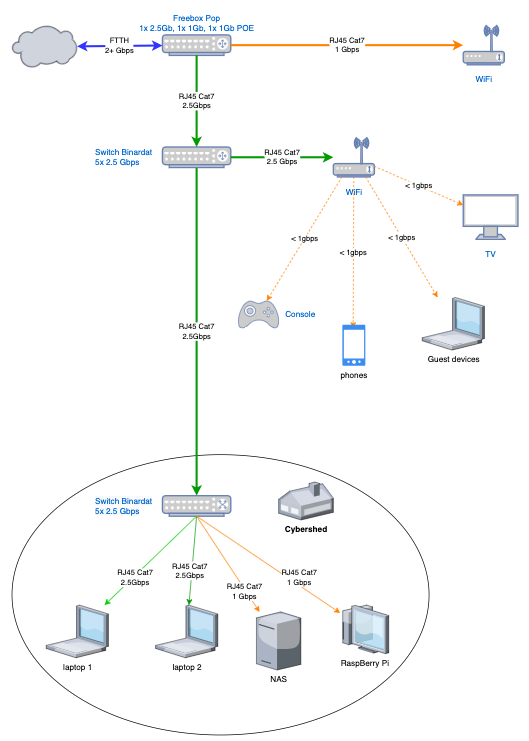 FTTH for home office — Diagram using draw.io
As mentioned, this is mostly an Ethernet-based setup for reliability, essentially for my work and backup devices. Everything else can benefit from at least gigabit speeds over WiFi6: home devices, phones, gaming console, TV.
The console has a gigabit Ethernet port but that too got damaged during the lightning strike and reverted to 100Mbps so WiFi works best, especially for downloading/updating games. For online gaming (my kids and I play Fortnite), using Ethernet makes more sense for signal stability.
The TV, like most models, sadly has a nerfed Ethernet port so again WiFi is preferred.
View the setup: Google Diagram - My Home Network - FTTH
Looking to the future
As of 2024, the peak fiber speed in experiments reaches over 400 terabytes per second! Of course this is achieved in a controlled experimental setting and fiber providers would need to upgrade some of their infrastructure.
I’m not too worried about commercial Internet reaching terabit speeds any time soon because it would require an overhaul of the current global Internet architecture. It will come, of course, but even streaming 4K or even 8K movies does not justify such an appetite.
I am also interested in the development of FTTR: Fibre To The Room. FTTR essentially uses fibre technology to extend FTTH: you would use fibre cables to transmit high-speed data to multiple rooms in your house. As of this post, only Huawei has a nascent FTTR offering.
It is not clear, however, whether FTTR has a clear advantage over Cat7, Cat8, or CatX Ethernet apart from being a super thin data medium.
Not a measuring contest
So why am I posting all this?
Am I happy with my setup? Extremely.
Am I bragging? Just a wee bit.
Am I improving the value of my house? Not necessarily but it is my belief it will help sell the house faster one day.
I would be remiss if I did not mention that upgrading your Internet access requires a bit of planning, despite what you may think.
So what does your home network look like?
Do you have projects? Let me know via the contact form!